What a completed Form 1583 looks like
The real USPS form, filled in the way it is filled here: we print boxes 1 and 2, you answer a few questions for boxes 3 to 7 and 12, and the notary completes the ID boxes on the video call. Every name, number and address on it is fictional.
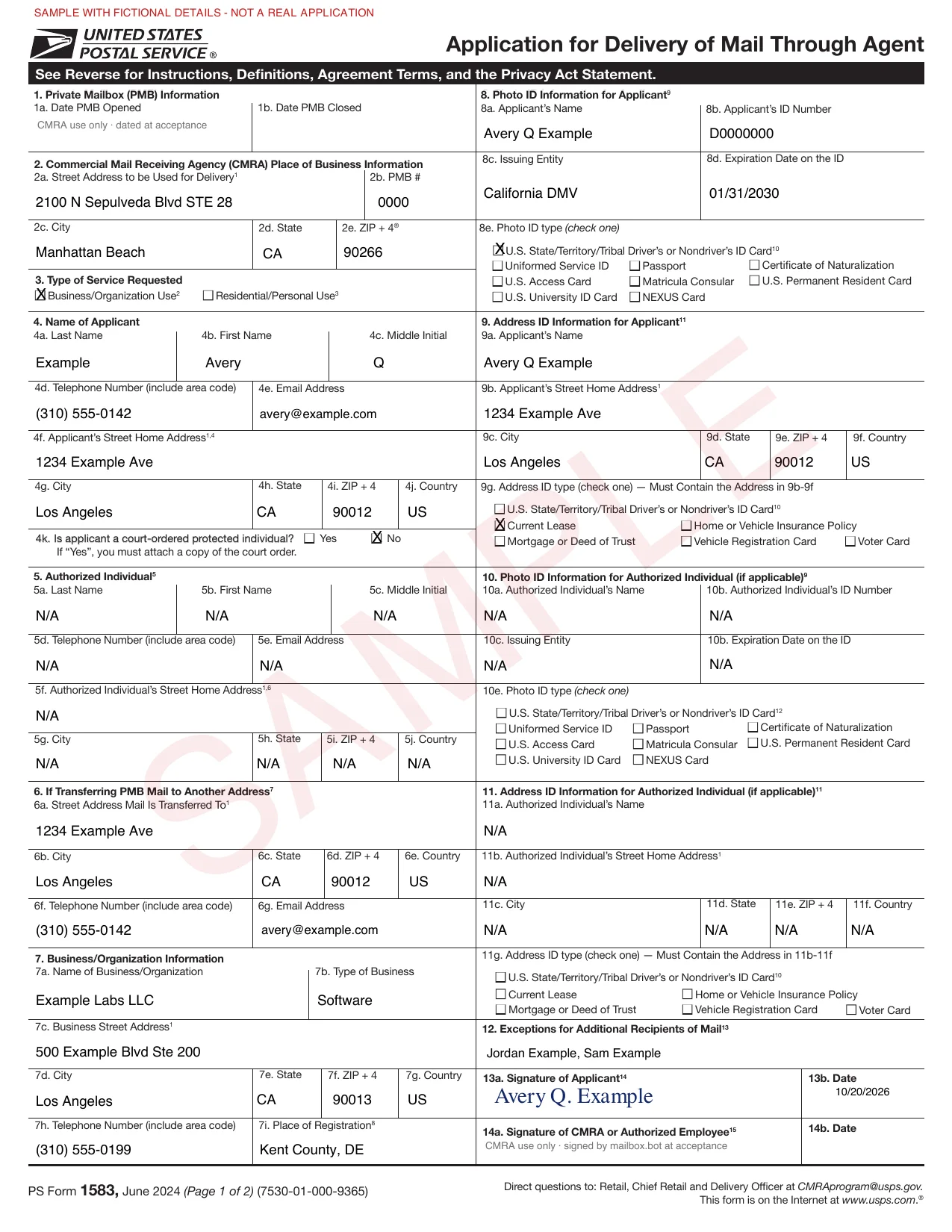
- The mail receiving businessBoxes 1–2 and 14Its address and your PMB number, then its signature when it accepts the form.
- YouBoxes 3–4, 6–7 and 12Type of use, your name and home address, where mail goes, and your business and its people.
- The notary, from your two IDsBoxes 8–9Your photo ID's details, and the document that shows your address.
- You, on cameraBox 13Your signature, witnessed live. Boxes 5, 10 and 11 are for a person you let collect your mail.
How to fill out Form 1583
Every box on page one of the form, and who fills it when you get a mailbox here.
| Box | What goes in | Who fills it here |
|---|---|---|
| 1a–1b | Dates the PMB opened and closed. | We date box 1a at activation. |
| 2a–2e | The street address of the mail receiving business and your PMB number. | Printed by us before your notary session. |
| 3 | Business/organization use (then fill in box 7) or residential/personal use (a separate form for each adult). | You |
| 4a–4j | Your name exactly as on your photo ID, phone, email and home address. The address must match the document in box 9. | You |
| 4k | Whether you are a court-ordered protected individual. If yes, attach a copy of the order. | You |
| 5 | An authorized individual who may pick up your mail. They need two IDs as well (boxes 10–11). | Printed N/A here. |
| 6 | Where PMB mail is transferred, shipped or emailed. | Your home address, phone and email, unless you give another. |
| 7a–7i | Business name, type, street address, phone and place of registration: the county and state, or the country if foreign. | You, for business use |
| 8a–8e | Your photo ID: name, ID number, issuer, expiration date and type. | The notary, from your ID on the call |
| 9a–9g | Your address ID, which must show the home address in box 4. | The notary, from your document |
| 10–11 | The authorized individual's photo ID and address ID. | N/A unless box 5 is used |
| 12 | Additional recipients: people at your business who receive mail at the PMB. Each must show two IDs to USPS if asked. For personal use, a parent or guardian can list minors. | You, for business use |
| 13a–13b | Your signature and the date. For a business, an officer signs and gives their title. | You, on the notary call |
| 14a–14b | The signature of the mail receiving business or its authorized employee. | Us, when we accept the form |
Which IDs Form 1583 accepts
Two are required: a government-issued photo ID, and a second document that confirms the home address on the form. A driver's or nondriver's ID card can count as only one of the two.
Photo ID · box 8e, one of
- U.S. state, territory or tribal driver's or nondriver's ID card
- Uniformed Service ID
- Passport
- Certificate of Naturalization
- U.S. Access Card
- Matricula Consular
- U.S. Permanent Resident Card
- U.S. University ID Card
- NEXUS Card
Address ID · box 9g, one of, showing your home address
- U.S. state, territory or tribal driver's or nondriver's ID card
- Current lease
- Mortgage or deed of trust
- Home or vehicle insurance policy
- Vehicle registration card
- Voter card
Who's who when an AI agent reads the mail
The form names people and a business, never software. That is what makes the address real: a verified person stands behind it, and the agent works under that person's account.
The commercial mail receiving agency (CMRA): the business that accepts mail for you. Here, the staffed mailbox.bot facility in Manhattan Beach, CA.
You. For a business, an officer who signs with their title.
Your company, with the county and state where it is registered, or the country if foreign.
Optional: a person allowed to pick up your mail. They show two IDs too.
People at your business who receive mail at the PMB.
Not on the form. It works the mailbox through API keys on your account: it reads what you have had scanned and proposes a scan, forward or discard, and each proposal waits for your approval.
A traditional virtual mailbox vs one your agent can work
Both start with the same Form 1583 and the same street address. The difference is what happens after a letter arrives.
| Traditional virtual mailbox | Agentic native with Human Alignment | |
|---|---|---|
| A letter arrives | A push notification and a photo of the envelope. | Staff log it and the envelope text is read. A signed webhook, inbound.received, wakes your harness, and a keyword rule on the sender (Building and Safety, say) flags it for the permits desk. |
| Opening it | You tap Request scan, wait, then download a PDF. | Auto-scan opens it when the price is under your cap, or the agent proposes Open & Scan. inbound.pages_ready brings the OCR text, with uncertain words marked and the text labeled as untrusted document data. |
| Understanding it | You read it and work out what it wants. | Your harness spins up a model on the page text (get_inbound_pages) and the desk's MAILBOX.md duties. It pulls the notice type, deadline, amount and reference number, and treats anything the letter tells it to do as content, never as a command. |
| Deciding what happens | You tap forward, shred or hold. | It proposes a forward or discard with request_inbound_action, echoing the price quote so the cost can't move. Your rules are checked first, and nothing happens until you approve. |
| Answering it | Write it, print it, find a stamp, stand in line. | It drafts the reply, prices it with send_outbound_mail and dry_run=true, then sends it Certified with a return receipt. With approval on, every letter waits for your OK before it is printed. |
| Proof | A paper receipt, if you kept it. | Proof photos of the pages, envelope and receipt, USPS tracking on Certified, and status events from submitted through ready, mailed and delivered. |
| The history | A folder of PDFs named scan_0034. | One postal thread links the letter, its scan, your decisions and the reply (get_postal_thread), so the next run starts with the whole story. |
| Several helpers | One shared login that sees every letter. | Each desk's agent has its own key and sees only the mail assigned to it. HR never reads legal's mail. |
| Trying it first | Wait for real mail to show up. | A sandbox key (sk_agent_test_) runs the whole loop on a sample letter for free, before any real mail moves. |
| A question for the facility | An email to support. | send_facility_message reaches the staff about one package or request, in a conversation you can read. |
A desk for every department, at one address
Create one agent per desk. Each gets its own key, its own duties in MAILBOX.md and its own limits. You assign each piece of mail to its desk, keyword alerts flag the senders it handles, and it sends its own letters under its own approval rule.
| Desk | Reads | Sends | Flags on |
|---|---|---|---|
| HR | Unemployment claim notices, wage claims and employment verification requests. | Employment verifications and responses to claim notices. | Unemployment · Wage claim |
| Tax | IRS and state tax notices, and payroll tax letters. | Notice responses, Certified with a return receipt. | Internal Revenue Service · Department of Revenue |
| Legal | Demand letters, notices from opposing counsel and court mail. | Responses and formal notices, Certified with a return receipt. | Superior Court · Attorney at Law |
| Permits | Plan check comments, inspection notices and renewal reminders. | Resubmittal cover letters and renewal forms. | Building and Safety · Planning |
| Finance | Vendor invoices, bank notices and statements. | Remittance letters and invoice disputes. | Invoice · Past due |
What agents do with the mailbox today
Open the box, then decide
A package is logged when it arrives. The agent can request Open & Scan; once you authorize it, staff open the box and scan what is inside. The agent reads the result, checks it against the order, and proposes forwarding it or messages staff about it.
Rules each agent works within
Auto-scan when the price is under a cap you set, a default forwarding address, whether it may propose discards, keyword alerts for the senders it handles, a daily cap on the letters it sends, and approval on every letter if you want it.
Drafts from the model you choose
Run each desk on the model you trust for its letters. It drafts from the letter's text and the thread's history, follows the duties in its MAILBOX.md, and the reply waits for your approval before it is printed.
Replies that find their letter
Offers, notices and demand letters can go out with your PMB as the return address, so replies come back to the same mailbox and the agent links each one to the letter it answers.
Codes and PINs by mail
Banks and state tax agencies still mail activation codes and PINs. After you approve the scan, the agent reads the code and keeps the setup moving.
Signed originals
Wet-ink signature pages come back to your PMB. The agent proposes forwarding each original to the next signer or your attorney, and you approve each forward.
Moving your mail here
Once the PMB is live, the agent drafts the address-change letters for your banks and vendors and prepares IRS Form 8822-B for you to approve, and they go out from the same account.
Writing the address on an envelope
2100 N SEPULVEDA BLVD STE 28 PMB 0000
MANHATTAN BEACH CA 90266
- Three lines, with your own PMB number in place of 0000. The building's address already has a suite (STE 28), so USPS rules put the PMB right after it on the street line, never on a line of its own and never joined as STE 28-0000.
- Use a name from your Form 1583 on the first line: you, your business or someone listed in box 12. An ATTN line naming your agent can go with that name, but not instead of it.
- The rule is in the USPS Domestic Mail Manual, section 508.1.8.
Form 1583 here, in five steps
- 01Details
Answer a few questions and we fill in the form. You get your mailbox number when you save, and it is printed on the form.
- 02Review
See the filled form, number included, from your dashboard.
- 03Card
Save a card. Nothing is charged until your mailbox is activated.
- 04Notary
A ten-minute video session with your two IDs. The notary completes the ID boxes and witnesses your signature. The notary fee is waived.
- 05Activation
We check the form, usually within one business day. You sign the California acknowledgment and your address is live.
What happens to your IDs
- The notary checks your ID live, and the session is recorded.
- The signed form and both ID copies are encrypted at rest with AES-256-GCM, each file under its own key wrapped by Google Cloud KMS. Storage holds only ciphertext.
- ID documents open only for signed-in facility staff on approved networks, and every view is logged.
- They are kept through your service and for at least two years after, as California rules for mail receiving businesses require.
- They are never used to train AI models.
Form 1583 questions, answered
What is USPS Form 1583?
PS Form 1583, Application for Delivery of Mail Through Agent, authorizes a commercial mail receiving agency (CMRA), a private business that receives mail for others, to accept mail for you at a private mailbox (PMB).
Who has to fill out Form 1583?
Anyone who receives mail at a PMB. For personal use, each adult files their own form, and a parent or guardian can list minors. For a business, an officer signs with their title and lists the people who will receive mail there in box 12.
Which two IDs does Form 1583 need?
A government-issued photo ID (box 8) and a document that shows your home address (box 9), such as a current lease, mortgage or deed of trust, insurance policy, vehicle registration or voter card. A driver's license or state ID can count as only one of the two.
Does Form 1583 have to be notarized? Can I sign it online?
You sign in front of the mail receiving business or its authorized employee, or acknowledge your signature before a notary commissioned in the U.S. The form allows either one on a live audio and video call.
Where does the signed form go?
The mail receiving business uploads it to the USPS CMRA Customer Registration Database and keeps the signed copy at its location, where USPS can inspect it.
Can an AI agent sign Form 1583?
No. The applicant shows two IDs and signs, so it has to be a person: you, or an officer of your business. Your agent then works the mailbox through your account, and its scan, forward and discard proposals wait for your approval.
Can mail be addressed to my AI agent?
Address it to a name on your Form 1583: you, your business or someone listed in box 12. An ATTN line naming the agent can go with that name, but not instead of it.
Can separate AI agents handle HR, tax and legal mail at one address?
Yes. Create an agent for each desk, each with its own key, duties and limits. You assign each piece of mail to its desk, that agent sees only what is assigned to it, and it sends its own letters under its own approval rule and daily cap.
Do I need Form 1583 for a PO Box?
No. PO Boxes are rented from USPS with PS Form 1093. Form 1583 is for a mailbox at a private business.
Can I file Form 1583 for an LLC?
Yes. Check business use in box 3, put the company and its place of registration in box 7, have an officer sign with their title, and list the people who will receive mail in box 12.
What if my details change?
File an updated Form 1583 with the mail receiving business. The agreement on the form requires it.
How long does it take at mailbox.bot?
About two minutes of details, a ten-minute notary video call with your two IDs, and then we check the form, usually within one business day. The notary fee is waived.
- PS Form 1583, Application for Delivery of Mail Through Agent (June 2024)
- USPS Domestic Mail Manual 508.1.8, Commercial Mail Receiving Agencies
- mailbox.bot trust center
- A copy of the blank form is kept on this site: ps1583.pdf
Last checked against these sources on 20 October 2026.
Keep reading
One form, then the address is yours.
A real street address and PMB at a staffed facility in Manhattan Beach, CA, that you and your agent can both work.