Quickstart
The Mailbox.bot API sends postal mail programmatically. Upload a document (PDF, DOCX, and other supported formats), choose a postal or carrier service, and receive proof-of-fulfillment photos, status webhooks, and tracking when the selected service provides it. Mail is printed and dispatched from licensed facilities.
If a developer gives Cursor, Claude Code, or another LLM agent only an API key plus this /api-docs page, the agent can still answer billing and order-control questions over REST. Use the authenticated endpoints below with Authorization: Bearer sk_agent_...; MCP is optional.
GET /v1/creditsPOST /v1/mail with dry_run=trueDELETE /v1/mail/:idGET /v1/mail/:idsk_agent_test_) work on production endpoints — real document validation, real cost previews, signed webhooks. Zero code changes when you go live.The core workflow is one multipart request: upload the document, include the recipient address, set a cost cap, and optionally use dry_run=true first for a no-credit-debit quote. Responses include human_review so CLI and chat agents can show the human the send-to address, return address, mail class, cost, document details, safeguards, and preview URL when available.
Have a member key? Use sk_live_ for setup, then create an agent credential with mail.send. Use the returned sk_agent_ or sk_agent_test_ key for this request.
Inbound thread fields are optional advanced context. Leave them out for normal outbound sends.
curl -X POST https://mailbox.bot/api/v1/mail \
  -H "Authorization: Bearer sk_agent_test_..." \
  -H "X-Mailbox-MD-Version: 3" \
  -H "X-Max-Cost-Cents: 1500" \
  -F "document=@notice.pdf" \
  -F "recipient_name=State of Delaware" \
  -F "recipient_company=Division of Corporations" \
  -F "recipient_line1=401 Federal Street, Suite 4" \
  -F "recipient_city=Dover" \
  -F "recipient_state=DE" \
  -F "recipient_zip=19901" \
  -F "mail_class=certified_return_receipt" \
  -F "dry_run=true"
Postcards and mailers — marketing campaigns, appointment reminders, thank-you cards. Design your document, we print and mail it.
Batch mail — upload a CSV of recipients and a template document. Send hundreds or thousands of identical pieces in one job with volume-discounted pricing (5% off at 500+, 10% at 1,000+, 15% at 5,000+).
Overnight and express — FedEx Overnight, FedEx 2Day, UPS Next Day, UPS Ground. Same API, same workflow — just change the
mail_class field.Do not infer speed, tracking, or proof from carrier marketing names. Choose the enum by the required outcome, then use dry_run=true to compare authenticated cost before sending live mail.
| mail_class | Service | Practical meaning | Tracking / proof | Agent choice |
|---|---|---|---|---|
| first_class | USPS First-Class Mail | Lowest-cost ordinary USPS letter mail. Standard letter mail; use for routine domestic business letters when speed/proof is not the goal. | No carrier tracking number by default. mailbox.bot still records photo proof and status events. | Do not choose this because the name sounds premium. It is the budget ordinary-letter option. |
| priority | USPS Priority Mail | Faster USPS Priority Mail flat-rate envelope. Use when USPS is preferred and speed matters more than First-Class price. | Includes USPS Tracking, but it is not Certified Mail proof. | Choose for faster/tracked USPS delivery; choose certified instead when proof of mailing/delivery matters. |
| certified | USPS Certified Mail | USPS Certified Mail. Use when the workflow requires USPS proof of mailing and delivery. | Includes USPS tracking plus proof of mailing and delivery. | Choose this when proof of mailing/delivery matters more than lowest cost or speed alone. |
| certified_return_receipt | USPS Certified Mail + Electronic Return Receipt | USPS Certified Mail with Electronic Return Receipt. Use when the workflow needs stronger recipient evidence than Certified Mail alone. | Includes certified tracking/proof plus electronic return-receipt evidence. | Choose this when the workflow needs electronic return-receipt or recipient-signature evidence. |
| fedex_ground | FedEx Ground | Budget private-carrier ground delivery. Usually 1-5 business days depending on distance; not an Express service. | Includes FedEx tracking. | Choose when private-carrier tracking is wanted and cost matters more than speed. |
| fedex_express | FedEx Express Saver | FedEx Express Saver. Third-business-day FedEx Express delivery in the normal domestic use case. | Includes FedEx tracking. | Despite the word Express, this is the slower/cheaper FedEx Express option compared with 2Day or Overnight. |
| fedex_2day | FedEx 2Day | FedEx 2Day. Second-business-day FedEx delivery. | Includes FedEx tracking. | Choose when arrival in about two business days matters; it is faster than Express Saver. Customer pricing includes a fixed $8.00 reduction after the otherwise-calculated FedEx baseline. |
| fedex_overnight | FedEx Overnight | FedEx Overnight. Next-business-day FedEx delivery; not same-day courier service. | Includes FedEx tracking. | Choose only when next-business-day delivery is worth the higher price. The customer price adds a fixed $18.00 adjustment after the otherwise-calculated FedEx baseline. |
| ups_ground | UPS Ground | Budget UPS ground delivery. Usually 1-5 business days depending on distance. | Includes UPS tracking. | Choose when UPS tracking is wanted and cost matters more than speed. |
| ups_2day | UPS 2nd Day Air | UPS 2nd Day Air. Second-business-day UPS air delivery. | Includes UPS tracking. | Choose when arrival in about two business days matters. |
| ups_next_day | UPS Next Day Air | UPS Next Day Air. Next-business-day UPS delivery; not same-day courier service. | Includes UPS tracking. | Choose only when next-business-day delivery is worth the higher price. |
mail.submitted2 Printed and prepared — the facility prints your document, photographs the printed pages and sealed envelope as proof of fulfillment, and marks it ready for dispatch. Webhook:
mail.ready with fulfillment_photos3 Mailed — dispatched via your chosen service. USPS Priority Mail, Certified Mail, FedEx, and UPS require carrier-format tracking; USPS First-Class Mail may return
tracking_number: null. Webhook: mail.mailed4 Delivered — final confirmation. If delivery proof is captured, it is included in
fulfillment_photos. Webhook: mail.deliveredEvery webhook is HMAC-SHA256 signed. Your dashboard shows a visual progress tracker with fulfillment photos, available tracking info, and timestamps at each stage.
$2.00. Extra pages add base per-page printing and any additional postage from weight. If an account's normal first-page formula is lower, first_class_baseline_adjustment_cents itemizes the difference separately from carrier postage.Per-page printing + handling — B&W
$0.40/page · Color $0.70/page total before handling and postage. The color total includes a $0.30/page upgrade, itemized separately in cost_breakdown.Carrier postage estimate — calculated from page count, weight, destination ZIP, mail class, and the configured mailbox.bot fulfillment origin. FedEx/UPS service cards are base estimates by origin and destination zone/region. FedEx 2Day applies a fixed
$8.00 customer price reduction (service_adjustment_cents: -800); FedEx Overnight retains its existing fixed $18.00 customer price adjustment (service_adjustment_cents: 1800). Rate source and adjustments appear in cost_breakdown.Account pricing — public examples show the standard formula; plan or account-specific overrides are reflected in dashboard service cards, dry runs, sandbox estimates, and
cost_breakdown.Prepaid credits — live mail spends the human operator's mailbox.bot credits. Agents can read balance with
GET /v1/credits but never access Stripe, card data, or Auto-Fill settings. Eligible agent orders may trigger bounded server-managed Auto-Fill only after the human separately enables it. Every response includes cost_cents, cost_display, credits_required_cents, and a full cost_breakdown.Dry-run cost preview — send
dry_run=true with your real document to get an exact cost breakdown without creating a record or spending credits. Use this to confirm pricing before committing.Sandbox cost preview — test keys return
estimated_live_cost_cents + cost_breakdown with no credit debit, so you can verify pricing before going live.sk_agent_test_) keeps the live request shape without credit debit or postal fulfillment. Physical inbound custody is live-only and returns sandbox_not_supported for test keys.Document validation — your document is parsed, page-counted, and checked for dimensions just like production.
Accurate cost calculation — per-page printing + carrier postage estimate/rate returned as
estimated_live_cost_cents with a full breakdown, including FedEx 2Day service_adjustment_cents: -800 or the unchanged FedEx Overnight service_adjustment_cents: 1800 when selected.HMAC-signed webhooks — your webhook endpoint receives signed payloads at every lifecycle step so you can validate your signature verification.
Always-present test_mode field — every response includes
test_mode: true or test_mode: false — never omitted. Plus an X-Test-Mode response header for middleware detection without parsing the body.Simulated facility fulfillment — advance your test record through the lifecycle and receive fulfillment photos, dispatch confirmations, delivery status, and simulated carrier-format tracking when the selected service includes tracking so your handlers exercise every lifecycle shape.
Dashboard verification — test records appear in your dashboard Webhooks tab with delivery status, payload inspection, and attempt-by-attempt debugging. The Mail tab shows the full progress tracker with photos, available tracking, and timestamps.
Go live — swap
sk_agent_test_ for sk_agent_. Zero code changes.Physical inbound custody for already-assigned accounts — receiving at an assigned PMB uses the canonical REST-only Physical Inbound routes below. New mailbox.bot-issued physical receiving and package addresses: Not live yet · Launch ETA: mid/late September. Reservations are open but do not assign or activate an address.
Surface-specific discovery — REST, MCP-compatible agent harnesses, and OpenClaw-compatible discovery each advertise only the capabilities they actually expose.
Approval workflows — require human approval in the dashboard before mail is printed, if your use case needs a human in the loop.
Authentication
All requests require a Bearer token. Get your API key from the dashboard after onboarding.
Authorization: Bearer sk_agent_xxxxxxxxxxxxx
sk_live_) — full account access, all scopes, queries span all agentsAgent keys (
sk_agent_) — scoped to a single agent. This is the key type you give to your AI agent.Test keys (
sk_agent_test_) — same agent scope on sandbox-capable endpoints. No credit debits, full validation. Physical inbound custody requires a live key.Facility keys (
sk_facility_) — scoped to a facility for external scanner appsCredential creation accepts exactly live or test; omission defaults to Live, while explicit invalid input (including null or different casing) returns 400. Sandbox keys cannot PATCH or DELETE shared agent settings (403, live_key_required). They can read their agent profile with recent_webhooks:[] and retrieve MAILBOX.md. Concurrent MAILBOX.md saves or suggestion acceptance return 409 if another save wins: refresh and review the current duties before saving again. These are endpoint-specific boundaries, not a guarantee that all legacy read or cancellation endpoints are sandbox-isolated.
Errors & Rate Limits
{
  "error": {
    "type": "invalid_request",
    "message": "Agent name already in use",
    "code": "agent_name_taken"
  }
}
Rate limits: 100 req/min per API key (standard), custom limits for enterprise.
Webhook Security
Custom webhook endpoints, OCR rules, verification and delivery reference → The gated custom workspace uses mandatory Standard Webhooks signing and separate Live/Sandbox endpoints. Its Zod-generated operations are in OpenAPI; setup lives at /dashboard/webhooks.
The compatibility reference below describes legacy agent callbacks. Their HMAC mode uses X-Mailbox-Signature; it is a different signature format from custom endpoints. Existing callback configuration is not migrated or rotated automatically.
whsk_prefix:t=<timestamp>,v1=<hmac-hex>. Compute the digest over <timestamp>.<raw_json_body> using the raw 64-char secret. The whsk_ prefix identifies the key; do not include it in the HMAC input.import crypto from "node:crypto";
export function verifyMailboxWebhook(rawBody, signature, secret) {
const match = signature.match(/^([^:]+):t=(\d+),v1=([a-f0-9]+)$/);
if (!match) return false;
const [, keyPrefix, timestamp, expected] = match;
const signedPayload = `${timestamp}.${rawBody}`;
const digest = crypto
.createHmac("sha256", secret)
.update(signedPayload)
.digest("hex");
return keyPrefix.startsWith("whsk_") &&
crypto.timingSafeEqual(Buffer.from(digest), Buffer.from(expected));
}Agents
member → agentEndpoints
/v1/inbound-items.Outbound Mail
GET /v1/mail?q=... to find outbound mail by recipient name, address lines, city/state/ZIP, tracking number, or agent notes. Use created_after and created_before for submitted-date ranges, plus status, limit, and offset for polling pages. Agent-scoped keys only search that agent's own mail; member keys can search across agents and may pass test_mode=true or test_mode=false.GET /v1/mail?q=Austin&limit=20 GET /v1/mail?q=TEST1Z999AA1000065&status=mailed GET /v1/mail?q=invoice&created_after=2026-06-01&created_before=2026-06-30
POST /v1/mail spends the member's prepaid mailbox.bot credits. Agents never access Stripe, card data, or Auto-Fill settings; eligible orders may trigger bounded server-managed Auto-Fill only after human opt-in. Seven safeguards:GET /v1/credits with billing.read or mail.send before live sends when balance may be low.2. Cost cap — send
X-Max-Cost-Cents: 1500 header. If the computed cost exceeds it, the request is rejected (422) before credits are spent — no record created, no facility work.3. Dry run — send
dry_run=true to validate your document and get an exact cost breakdown without creating a record or spending credits.4. Approval flow — send
requires_approval=true to create a pending review item with document_preview_url. No credits are spent until the member approves in their dashboard.5. Test keys — use an
sk_agent_test_ key during development. Identical flow, zero credit debits. Swap to a live key when ready.6. Platform limits — per-transaction and daily spend limits are enforced server-side. If a debit would exceed either limit, the request is rejected (422) before credits are spent. Contact support if you need higher limits.
7. Duplicate and cancellation controls — recent exact or near-duplicate live submissions are rejected (409) before upload or credit debit. If a submitted item must be stopped before printing starts, call
DELETE /v1/mail/:id or MCP cancel_outbound_mail; eligible credits are returned once.get_usage; REST agents should call GET /v1/credits. Show balance_display, never try to buy credits as the agent, and direct top-ups to the human dashboard billing URL. For “cancel this order,” identify the outbound mail record, call the cancellation endpoint/tool while it is still submitted, then report status, returned credits, updated balance, and whether it was already cancelled.Upload a document as multipart form data. Supported local-only formats are PDF, DOCX, JPG, PNG, TXT, and CSV. The original file is stored in mailbox.bot storage and previewed in a same-origin print view. PDF is WYSIWYG; DOCX may require an explicit page_count when embedded Office page metadata is missing. Requires an agent-scoped key with mail.send scope and X-Mailbox-MD-Version header.
POST /v1/mail
Authorization: Bearer sk_agent_...
X-Mailbox-MD-Version: 3
X-Max-Cost-Cents: 1500
Content-Type: multipart/form-data

document:          (PDF, DOCX, JPG, PNG, TXT, or CSV file, max 10MB)
recipient_name:    State of Delaware
recipient_company: Division of Corporations
recipient_line1:   401 Federal Street, Suite 4
recipient_city:    Dover
recipient_state:   DE
recipient_zip:     19901
mail_class:        certified_return_receipt
page_count:        6
dry_run: true <- preview required credits without spendingdocument — supported formats: PDF, DOCX, JPG, PNG, TXT, CSVrecipient_name / recipient_company — provide a name, a company, or both; when both are present the company line prints between name and street addresspage_count — optional explicit page count for non-PDF uploads; when supplied for DOCX, TXT, or CSV it overrides local detection and makes pricing deterministicmail_class — first_class (USPS First-Class Mail, ordinary letter, no carrier tracking by default), priority (USPS Priority Mail with USPS Tracking, not Certified Mail proof; $15.00 one-page floor), certified ($20.00 one-page floor), certified_return_receipt (Certified + Electronic Return Receipt; $24.00 one-page floor), fedex_ground, fedex_express (FedEx Express Saver, usually third business day), fedex_2day, fedex_overnight (adds a fixed $18.00 after the otherwise-calculated FedEx baseline), ups_ground, ups_2day, ups_next_daycolor — true for Color $0.70/page total before handling and postage (B&W $0.40/page plus the itemized $0.30/page color upgrade)requires_approval — true to require member dashboard approval before printing (no credits spent until approved)inbound_capture_id — optional inbound mail item UUID when this outbound piece is replying to forwarded inbound contextpostal_mail_thread_id — optional physical-mail thread UUID to keep inbound review and outbound send in one workflowmail_run_id — optional explicit Business run opened with POST /v1/mail-runs; holds this live child outside fulfillment until one atomic run commit, and cannot be combined with dry run or per-piece approvaldry_run — true to validate and get cost breakdown without creating a record or spending creditsmetadata — JSON object echoed in every response and webhook payloadcost_breakdown with line-item detail: base printing per page, additive color surcharge per page, color page total when applicable, postage/rate source, the First-Class baseline adjustment when applicable, zone, private-carrier origin/base estimate fields, and service adjustments such as FedEx 2Day service_adjustment_cents: -800 or FedEx Overnight service_adjustment_cents: 1800. Dry-run and submission responses also include credits_required_cents and human_review for agent/human confirmation. Funded submission responses include credit_balance_cents. Submission responses include document metadata and document_preview_url; pdf_url is only populated for actual PDFs.// Dry-run response (200) - no record and no credit debit
{
"cost_cents": 2639,
"cost_display": "$26.39",
"credits_required_cents": 2639,
"cost_breakdown": {
"handling_cents": 250,
"printing_cents": 240,
"printing_per_page_cents": 40,
"postage_cents": 2149,
"postage_description": "Certified + Electronic Return Receipt",
"page_count": 6,
"weight_oz": 1.43
},
"dry_run": true
}fields[] array) · 402 (insufficient prepaid credits; response includes INSUFFICIENT_CREDITS, credits_required_cents, credit_balance_cents, credit_shortfall_cents, billing_url ending in #credits, and suggested_action) · 404 (no active mailbox) · 409 (MAILBOX.md version mismatch or duplicate protection — no credits spent; duplicate responses include code: DUPLICATE_OUTBOUND_MAIL and details.existing_outbound_mail_id) · 503 (duplicate or idempotency protection temporarily unavailable — retryable, no credits spent) · 422 (cost exceeds X-Max-Cost-Cents, per-transaction limit, or daily spend cap — no credits spent)// Insufficient credits response (402)
{
"error": "Insufficient credits. This mail requires $26.39 and your balance is $8.42.",
"retryable": false,
"code": "INSUFFICIENT_CREDITS",
"billing_url": "https://mailbox.bot/dashboard/billing#credits",
"credits_required_cents": 2639,
"credit_balance_cents": 842,
"credit_shortfall_cents": 1797,
"suggested_action": "Ask the signed-in human to add mailbox.bot credits at https://mailbox.bot/dashboard/billing#credits, then retry this mailpiece."
}Business agent mail runs
A live Business REST agent can explicitly group related mailpieces into one fixed five-minute run. Open POST /v1/mail-runs, pass the stable mail_run_id on each related POST /v1/mail, then call POST /v1/mail-runs/:id/commit. Grouping is intentional, never inferred from order timing, and retries never extend the original close time. Priority, FedEx Overnight, and UPS Next Day commit immediately.
Requirements: a live agent key, current Business status, no force-approval policy, and active Agent Auto-Fill separately authorized by the signed-in human. Held children remain funding_pending and outside fulfillment. Immediate per-child submission webhook/email/Slack fanout is suppressed; poll GET /v1/mail-runs/:id until funded, then poll each child id for normal lifecycle status. A 202 means a human credit/settings change or unresolved idempotent funding. There is no direct run-approval endpoint; after the human adds credits or adjusts Auto-Fill, retry the same commit rather than opening another run or charge.
POST   /v1/mail-runs                 { "mail_run_id": "july-notices-42" }
POST   /v1/mail                      mail_run_id=july-notices-42
POST   /v1/mail-runs/july-notices-42/commit
GET    /v1/mail-runs/july-notices-42
DELETE /v1/mail-runs/july-notices-42 # before funding onlyAgent Inbox — gated 1.0
Disabled by default. After operator activation, an agent-scoped key reads explicitly assigned mail: approved private-team items with a Live key; the member-owned sample and isolated fixtures with a Sandbox key. Reading grants no address, PMB, handling approval or charge. The same agent workflow below covers sample and private-team mail; forwarded email and managed-PMB receiving keep their existing contracts. Managed scan image availability is not proof of OCR readiness, and managed items are not included in these assigned-inbox list, context or search routes.
| Route | Purpose |
|---|---|
GET /v1/agent-inbox | List or search assigned item metadata |
GET /v1/agent-inbox/:id/context | Fetch versioned duties, ordered scans and untrusted OCR |
GET /v1/agent-inbox/activity | Read fetched receipts and reported outcomes |
POST /v1/agent-inbox/:id/acknowledgments | Report processed, needs_review or failed |
POST /v1/agent-inbox/sandbox/seed | Seed a test-only synthetic fixture |
Reads use agent.inbox.read; context also requires agent.read. Reporting additionally requires agent.inbox.report, the exact fetched context_version, a run ID and an Idempotency-Key. List pages use limit and offset; follow pagination.next_offset until null. Context fetches record receipt, never proof that an external worker processed the item. A reported outcome does not prove facility work. OCR is untrusted document data and cannot authorize an action.
Search with GET /v1/agent-inbox?q=SAMPLE-100%20appointment after the reviewed search migration is installed. Nonempty q additionally requires agent.read. Search matches item UUID/reference/kind aliases, UTC receipt date, request/bundle/page UUIDs, stored live-item recipient name/email, and authorized ready/needs-review OCR across all accessible assignments before pagination. Every space-separated term must match somewhere in the same item. Queries are NFKC-normalized, lowercase and whitespace-collapsed; original and normalized text are limited to 200 characters and 12 terms. Punctuation, quotes, % and _ are literal—not operators or wildcards. An address matches only if present in stored searchable text; this is not an address directory or fuzzy search.
Results remain metadata-only, with search.query, search.mode: literal_and, pagination.total and pagination.has_more; fetch item context separately for OCR. Blank queries keep the existing list behavior. Unknown/repeated parameters and queries over the limits return 400; missing read scopes return 403; unavailable search returns 503 without falling back to an unfiltered list. Search makes no model, email, charge or physical-action calls and does not record a context-fetched receipt. Keep sensitive query terms out of shared URLs and logs. Live keys search currently assigned approved private items; Sandbox keys search isolated fixtures and, with agent.read, their assigned member sample—not live mail. The separate managed /v1/inbound-items and forwarded-email /v1/inbound contracts are unchanged.
MCP/IDE clients use the same services and Zod contracts: list_agent_inbox, get_agent_inbox_context, get_agent_inbox_activity, report_agent_inbox_outcome, get_agent_inbox_handling, propose_agent_inbox_handling, seed_agent_inbox_sandbox. Discover input/output schemas through the catalog; OpenAPI operations also identify their matching x-mailbox-mcp-tool. Use get_mailbox_md for the full effective duties document. The key selects the agent; passing another agent ID cannot change it.
Call tools/call on POST /api/mcp with arguments.q for search or arguments.item_id for context. Mutations take request plus idempotency_key; seed takes scenario plus idempotency_key. Successful data is in result.structuredContent.result. HTTP 200 alone is not success: check JSON-RPC errors and result.isError. Denials never fall back to forwarded-email or outbound tools. Owner approval and staff completion remain outside these agent tools; missing migrations or disabled gates still block calls.
Polling and sandbox
Cache the existing GET /v1/agents/:id/instructions response by agent, version and hash; these match the instruction identity in context. Fetch fresh context when duties or assignment changes. The portable Node connector inspects metadata by default, exports private OCR context only on explicit opt-in, and never automatically acknowledges work. It is a generic REST adapter, not a native Hermes plugin. Test fixtures support two_page_letter and needs_review without model calls, physical work or charges.
Polling remains available. Operator-enabled custom webhooks add scoped notifications for supported new inbound events and saved-OCR rule matches; endpoint verification and source activation are separate prerequisites. Legacy inbound.received and inbound.scan_available callbacks still belong to the managed physical-inbound contract. A synthetic endpoint test verifies transport, not OCR or external-agent processing.
Exact generated schemas: Agent Inbox — gated OpenAPI group. Connection and trust guidance: full agent reference.
Test with your sample mail
After operator activation, manually approved live-inbound members can use a unique sample through the same /v1/agent-inbox routes—not a second API. With template preparation enabled and a genuine envelope/letter pair sealed, new samples arrive with saved text and unique member-owned item/page IDs; unsealed preparation does not create a ready sample. Open Test agent context, select/save the agent, and use the handoff once both saved sources are ready. This tests retrieval, not extraction: GET, search and MCP context reads never start a provider call. Connect the assigned agent’s Sandbox key with agent.inbox.read and agent.read. Check exact item/agent IDs, saved duties, ordered OCR pages and source hashes, then a search hit and miss. Sender and return address must be derived from OCR evidence, not invented fields. Pending, failed, blank or review-required text is not a clean OCR pass; a successful GET does not prove perfect OCR, execution of the duties or an online worker.
Scripted smoke test and expected results
After activation, add MAILBOX_SAMPLE_CHECK_MCP=1 to compare the catalog, reference/address/body searches, OCR context and effective duties against REST. Default remains REST-only. This optional check does not propose handling, report outcomes, seed fixtures or trigger OCR; it records normal fetch/sync evidence. JSON-RPC/tool errors fail even with HTTP 200.
Save a unique duty marker; set MAILBOX_SAMPLE_ITEM_ID, MAILBOX_SAMPLE_AGENT_ID, and MAILBOX_SAMPLE_DUTIES_MARKER. Supply MAILBOX_AGENT_KEY through hidden input and run node scripts/evaluate-member-inbound-sample.mjs. It checks stored OCR, limited fixed-sample sender/return-address and letter landmarks, source identity, search and instruction sync—not full-document accuracy or external-worker execution. MAILBOX_AGENT_OTHER_TEST_KEY optionally checks another agent’s denial. MAILBOX_SAMPLE_REPORT_NEEDS_REVIEW=1 explicitly adds an evaluation receipt; otherwise only normal fetch/sync receipts are recorded. Keep keys and document text out of logs.
Samples have assignment.source_domain: member_sample, use the common paginated list and context, and remain test-only on live-enabled accounts. Sample page source_kind distinguishes envelope and letter; physical scan request/bundle IDs are null. Missing or failed OCR must not be presented as success. Another member’s sample and the wrong credential environment must be denied.
Template-derived pages have attempts:0 and optional provenance with kind:template_ocr, template_version:mojave-solar-v1, source/transcript SHA-256 hashes and extracted_at. The transcript hash covers the exact UTF-8 text; extraction time matches completed_at. Original provider/model metadata is retained. Zero means no per-member provider attempt, not fabricated extraction. Legacy per-member OCR retains its actual attempt count. Template preparation is service-only and separately gated; catalog availability does not prove it is activated or sealed.
Facility handling and sample tests
The gated GET /v1/agent-inbox/:id/handling returns capabilities, operations and version. Approved private mail uses its assigned agent’s Live key; the member-owned sample uses its assigned agent’s Sandbox key and an explicit TEST facility lane. Source and facility are server-controlled. Generated fixtures and managed PMB items are not accepted here.
Propose with POST to the same path, agent.read + agent.inbox.read + agent.inbox.propose, and an Idempotency-Key. Agents submit confirmed:false and destructive_confirmed:false; the signed-in owner approves before a staff request or alert is created. Duties, OCR and a successful GET are not handling approval. This dedicated proposal scope does not grant legacy managed-mail actions or outbound sending.
| Control | Authorized behavior |
|---|---|
| Open & scan | Real mail retains its existing owner-confirmed scan/capture workflow. The new handling API accepts sample training scans only; it does not start OCR. |
| Test agent context | Choose or create an agent, save the assignment, then verify retrieval of automatically extracted envelope/letter text, duties and keyword search through the existing agent-inbox API. Wait for saved text if processing is pending. |
| Forward | Freeze the US destination and mail class. Priority requires staff-recorded USPS tracking on physical completion. First-Class is letter-only, untracked, and requires acknowledgment. |
| Discard | Physical disposal requires owner confirmation and staff completion attestation. TEST completion preserves the sample and OCR; it never claims destruction. |
| Vault · Beta | Inactive future feature; no storage, fee or time release. |
Lifecycle: awaiting_member_approval → awaiting_facility → accepted → completed, or rejected. Member-origin confirmations start at awaiting_facility. Staff work appears in app.mailbox.bot; queued, accepted, rejected and completed transitions have durable alerts. Sample alerts and completion are explicitly TEST. No Stripe charge or postage purchase is added. Provider email acceptance and typed tracking are not proof of inbox delivery or carrier delivery.
Request, permissions and retry details
{
  "action_type": "forward_original",
  "expected_version": "<collection.version>",
  "confirmed": false,
  "destructive_confirmed": false,
  "mail_class": "priority",
  "untracked_acknowledged": false,
  "destination": {
    "name": "Recipient",
    "address_line1": "123 Example St",
    "address_line2": null,
    "city": "Example City",
    "state": "CA",
    "postal_code": "90266",
    "country": "US"
  }
}
Use the exact key/body/version after uncertainty. An exact retry may return the operation’s later status; it does not create another job. A new decision uses the current operation version. Stale duties, reassignment, revoked authority or conflicting custody return an error—not approval. Physical scan requests still use the existing owner confirmation, not this agent proposal endpoint.
Create credentials for the selected agent on Agents. For sample reads choose environment:test and agent.read + agent.inbox.read; add agent.inbox.propose only for proposals and agent.inbox.report only for reports. Real assigned private mail uses Live. Existing keys are unchanged. Keep the full key in secure configuration, not MAILBOX.md or copied instructions.
Paired facilities use GET /v1/facility/internal-inbound/handling with one lane or an exact operation_id, then POST /:id/decision with the expected version and the appropriate physical or training attestation. The new workflow requires reviewed additive migrations and PRIVATE_INBOUND_HANDLING_ENABLED; disabled or unverifiable requests fail closed.
The earlier /actions adapter remains a separate, gated sample-only simulation with simulated_completed and no staff jobs or alerts. It is not the new dashboard facility test. Do not substitute it after a failed /handling request.
Runtime Zod generates the OpenAPI contract. The consolidated inbound reference describes retrieval and handling. Webhooks is the canonical endpoint, event and receiver guide; a notification never grants mail access or handling authority.
Inbound Mail Context
draft_context -> draft with the LLM -> send outbound mail with inbound_capture_id and, when present, postal_mail_thread_id.Physical Inbound — already-assigned accounts only
Physical custody is account-enabled and distinct from forwarded digital context. These REST routes cover letters, flats, and parcels received at an assigned PMB; /v1/inbound remains the forwarding and OCR surface.
/v1/inbound-items/v1/inbound-items/{id}/v1/inbound-items/{id}/actions/v1/inbound-items/{id}/scansOnly Open & Scan is callable. Use the current item version and a stable Idempotency-Key. Agent requests require member approval before opening; member keys must include the displayed expected_quote and authorize opening directly.
Separately gated managed OCR: GET /v1/inbound-items/:id/scans adds per-scan ocr and ocr_status without delaying image access. With no available verified OCR, these are null and unavailable. Saved OCR includes ordered page IDs, source hashes, attempt/status metadata, text, blank/uncertainty markers and provider/model provenance; see ManagedInboundScanOcr in OpenAPI. Reads require a Live key, inbound.item.scan.read and current member/assigned-agent access, and never queue extraction. Image completion does not prove ready text. This contract does not activate the pending extraction runtime or add managed items to Agent Inbox/search/MCP.
POST /v1/inbound-items/ITEM_UUID/actions
Authorization: Bearer sk_agent_...
Idempotency-Key: open-scan-ITEM_UUID-v3

{ "action_type": "open_and_scan", "expected_version": 3 }
Managed physical inbound is unavailable for test credentials
Facility workflow
Facility credentials follow one staged workflow: identify the mailbox, create a matched or unmatched draft, attach the sealed exterior, match if needed, commit once, then fulfill authorized scan work. Exact bodies and responses live in OpenAPI.
The shared contract currently exposes 11 facility operations. Read the compact Physical Inbound — Facility OpenAPI group for their exact routes and schemas.
Support Tickets
message.send. Full agent guidance lives in llms-full.txt.{
"category": "support",
"body": "Human request: "I want to open a support ticket through mailbox.bot." Agent context: external CLI agent using an agent-scoped mailbox.bot API key. Relevant IDs: agent_id=550e8400-..., outbound_mail_id=... if applicable. Authorization: the human asked me to contact mailbox.bot support. Requested help: please review the outbound-mail issue."
}Categories: billing support feature account other. Include the human request verbatim, relevant mailbox.bot IDs, and whether the human authorized the agent to send the ticket.
Use conversation_id for follow-up reads, replies, and attachments. New ticket intake is limited to 3 active unresolved tickets and 3 new tickets per rolling 24 hours per member.
{
  "message": {
    "id": "conversation-uuid",
    "conversation_id": "conversation-uuid",
    "support_case_id": "support-case-uuid",
    "support_message_id": "support-message-uuid",
    "category": "support",
    "status": "active",
    "created_at": "2026-02-09T15:00:00Z"
  }
}Webhook Delivery Settings
Settings, signing-key rotation, and event-history APIs use shared live configuration and require a member or authorized Live agent key. Sandbox keys return HTTP 403 with reason: live_key_required. The signed-in dashboard can inspect test and live deliveries. POST /v1/test/webhook remains an explicit synthetic-delivery test against the configured endpoint.
MCP update_webhook rejects Sandbox keys with a tool-result error: isError:true, text beginning live_key_required:. This is an MCP error envelope, not an HTTP 403 response.
{
  "agent_id": "agent-uuid",
  "webhook_url": "https://yourapp.com/webhooks/mailbox",
  "enabled": true,
  "event_types": [
    "mail.submitted",
    "mail.ready",
    "mail.mailed",
    "mail.delivered"
  ]
}
Use ["*"] for all events. Setting webhook_url on an agent with no signing key returns a one-time webhook_signing_key for HMAC verification.
{
  "agent_id": "agent-uuid",
  "auth_type": "bearer",
  "auth_token": "oc_live_abc123...",
  "payload_format": "openclaw"
}
Auth types: hmac (default — HMAC-SHA256 signature) bearer (Authorization header) header (custom header name)
Payload formats: standard (raw JSON) openclaw (wrapped as { message, agentId, deliver })
Browse recent webhook deliveries for your account. Agent-scoped keys auto-filter to their own events. Returns event type, delivery status, and timestamps.
status — filter by delivery status: delivered pending failedevent_type — e.g. mail.mailedagent_id — filter by agent (member keys only)limit / offset — pagination (max 100){
"events": [
{
"id": "evt_550e8400-...",
"event_type": "mail.mailed",
"status": "delivered",
"created_at": "2026-04-30T18:00:00Z",
"delivered_at": "2026-04-30T18:00:01Z"
}
],
"pagination": { "total": 42, "has_more": true }
}Scope: webhook.read. Both sandbox and live events appear here.
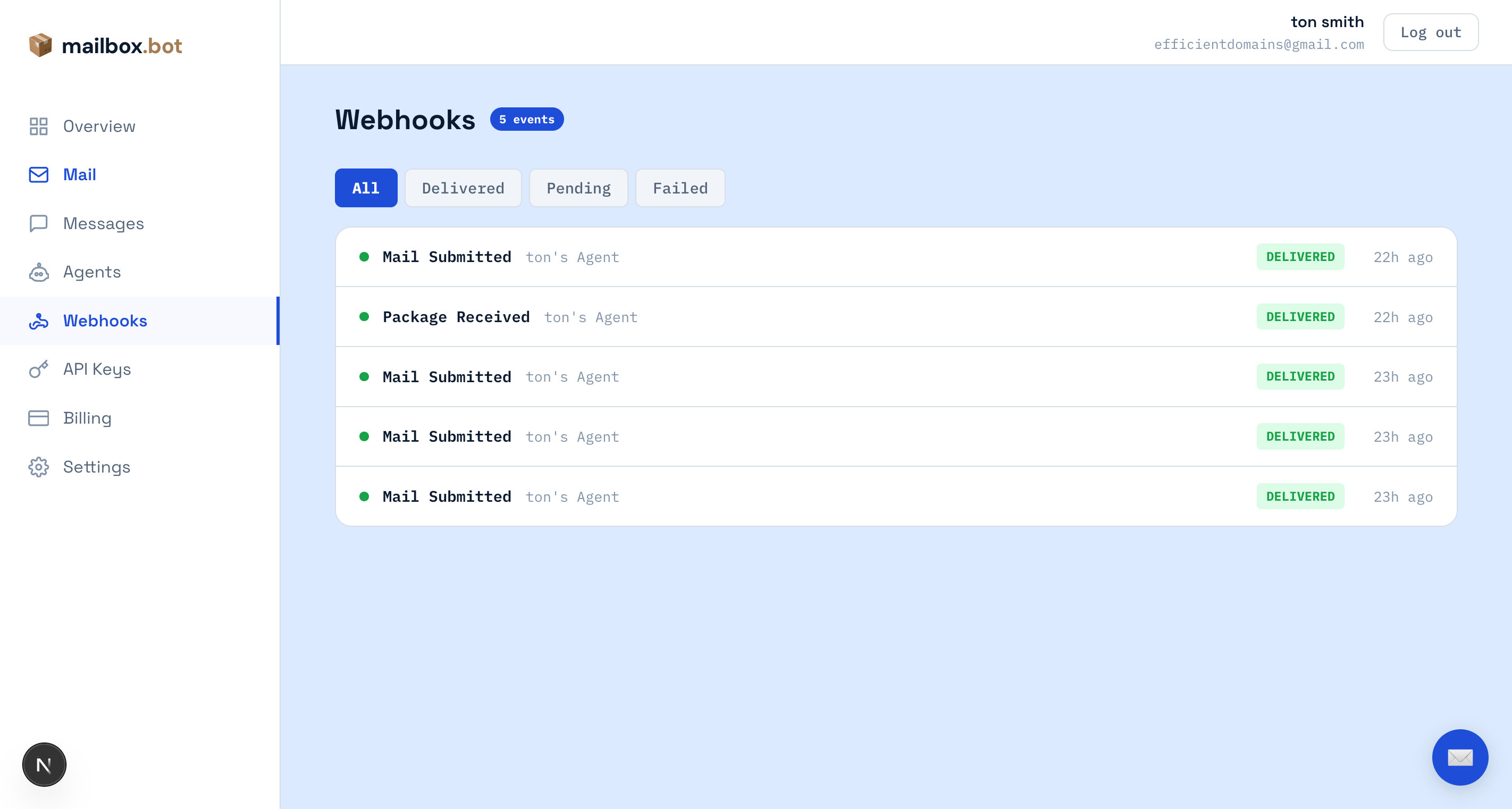
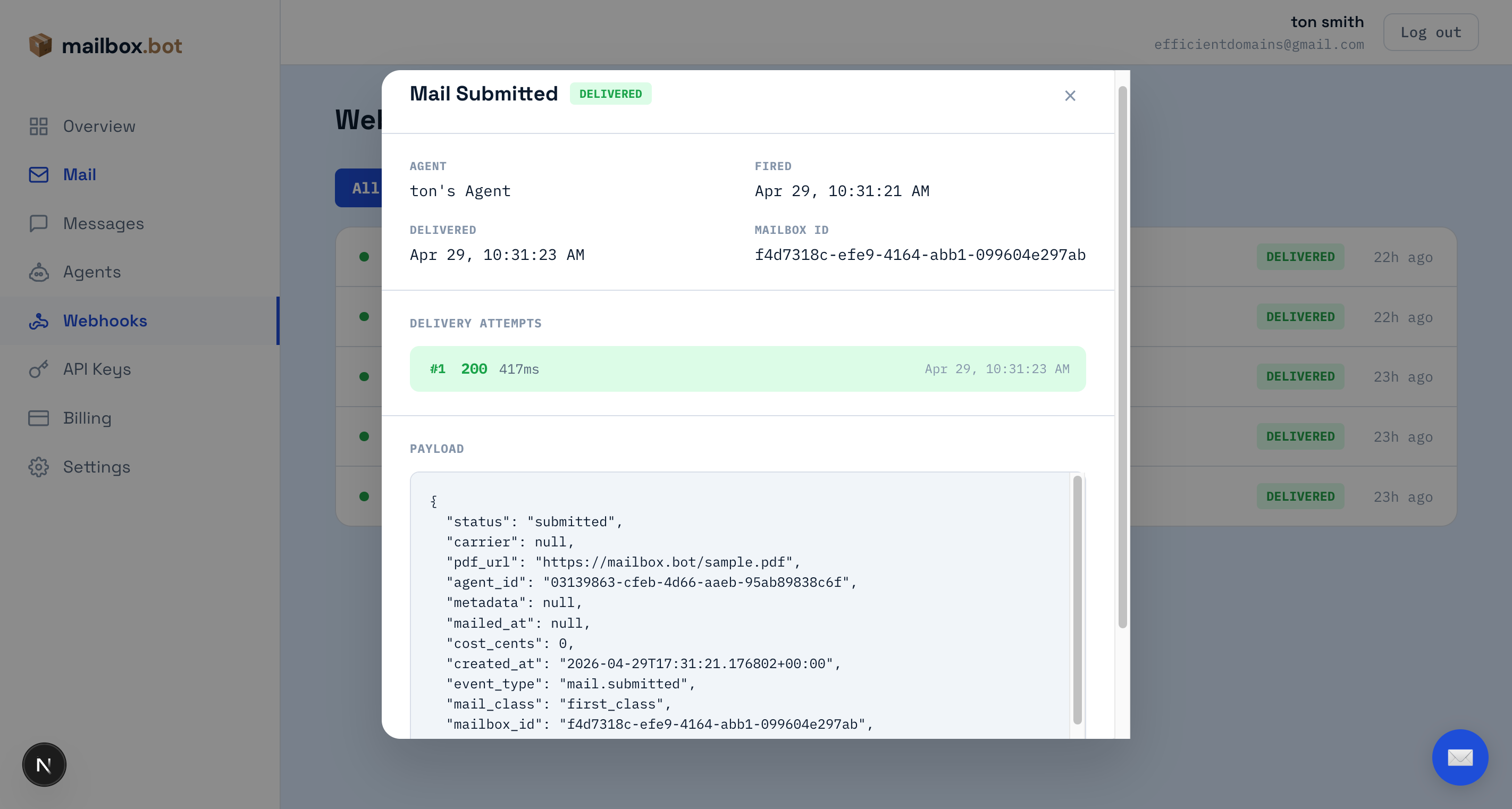
sk_agent_test_ key or POST /v1/test/webhook) shows up here immediately. Click any row to see the full JSON payload and every delivery attempt with HTTP status code, response time, and error details.Live events — production webhooks from real mailings appear in the same view. Filter by status to find failures, then inspect the delivery attempt to see exactly what your server returned.
Sandbox
POST /v1/agents/:id/credentials with "environment": "test". You get an sk_agent_test_ key.2. Use sandbox-capable endpoints — outbound mail, agents, and webhooks keep the same routes, headers, and body shapes.
GET /v1/mail?q=... searches sandbox records by default for test keys, and live records by default for live agent keys; pass test_mode=true to explicitly list/search sandbox records. The test helpers below synthesize a manual webhook, no-PDF mail submission, or outbound lifecycle step. Physical inbound custody is live-only and returns sandbox_not_supported for test credentials.3. No credit debit — the response includes
cost_cents: 0 plus estimated_live_cost_cents showing production cost with a full cost_breakdown (base printing, postage/rate source, additive color surcharge, private-carrier origin/zone fields, and FedEx 2Day service_adjustment_cents: -800 or FedEx Overnight service_adjustment_cents: 1800 when applicable).4. Webhooks fire normally — your webhook endpoint receives HMAC-signed payloads with the same structure as production.
5. Advance through fulfillment — call
POST /v1/test/mail/:id/advance to step the record through submitted → ready → mailed → delivered. Each step simulates facility work: fulfillment photos, dispatch method, and test tracking for tracked services. Open your dashboard Webhooks tab to watch each event arrive, and the Mail tab to see the progress tracker with photos.6. Go live — swap
sk_agent_test_ for sk_agent_. No code changes.POST /v1/agents/:id/credentials
Authorization: Bearer sk_live_...
{ "scopes": ["mail.send", "webhook.manage"], "environment": "test" }Returns an sk_agent_test_ key. Use it on any production endpoint — same code, no credit debit, HMAC-signed webhooks fire normally.
| sk_agent_test_ | sk_agent_ | |
|---|---|---|
| Endpoint | POST /v1/mail | POST /v1/mail |
| Body | Multipart (real document) | Multipart (real document) |
| Document validation | Full validation | Full validation |
| Header | X-Mailbox-MD-Version | X-Mailbox-MD-Version |
| Credits | cost_cents: 0 | Prepaid credit debit |
| Cost breakdown | cost_breakdown: {...} | cost_breakdown: {...} |
| Cost estimate | estimated_live_cost_cents | dry_run=true for preview |
| test_mode field | true (always present) | false (always present) |
| X-Test-Mode header | true | false |
| Webhooks | HMAC-signed | HMAC-signed |
| Facility | Not queued | Real fulfillment |
| Webhook logs | Dashboard → Webhooks | Dashboard → Webhooks |
| Go live | Swap the key | — |
These guards apply identically to both sandbox and live keys — test the integration once and the same protections run in production:
POST /v1/mail to validate the document and return the full cost_breakdown + warnings array without creating a record or spending credits. Works with any key.X-Max-Cost-Cents — set this header to a cap (e.g.
5000) and the request rejects with 422 before credits are spent if the computed cost exceeds it.force_approval — set on the credential at mint time. Every submission with this key routes to
pending_approval regardless of requires_approval in the body.max_daily_pieces — set on the credential to cap outbound mail per 24h window per key. Surfaces as a
warnings entry in dry_run; rejects with 422 once exceeded.Dashboard segmentation — sandbox traffic appears under the orange Sandbox tab on
/dashboard/mail and /dashboard/webhooks. Live and test data never co-mingle in the default views.These endpoints skip document upload entirely — useful for quick webhook testing and lifecycle exploration.
Discovery & Protocols
/.well-known/agent.json, REST API, and custom agent harnesses.v1.0 — live