Quickstart
The Mailbox.bot API sends postal mail programmatically. Upload a document (PDF, DOCX, and other supported formats), choose a postal or carrier service, and receive proof-of-fulfillment photos, status webhooks, and tracking when the selected service provides it. Mail is printed and dispatched from licensed facilities.
sk_agent_test_) work on production endpoints — real document validation, real cost previews, signed webhooks. Zero code changes when you go live.The core workflow is one multipart request: upload the document, include the recipient address, set a cost cap, and optionally use dry_run=true first for a no-charge quote.
Have a member key? Use sk_live_ for setup, then create an agent credential with mail.send. Use the returned sk_agent_ or sk_agent_test_ key for this request.
Inbound thread fields are optional advanced context. Leave them out for normal outbound sends.
curl -X POST https://mailbox.bot/api/v1/mail \
  -H "Authorization: Bearer sk_agent_test_..." \
  -H "X-Mailbox-MD-Version: 3" \
  -H "X-Max-Cost-Cents: 1500" \
  -F "document=@notice.pdf" \
  -F "recipient_name=State of Delaware" \
  -F "recipient_company=Division of Corporations" \
  -F "recipient_line1=401 Federal Street, Suite 4" \
  -F "recipient_city=Dover" \
  -F "recipient_state=DE" \
  -F "recipient_zip=19901" \
  -F "mail_class=certified_return_receipt" \
  -F "dry_run=true"
Postcards and mailers — marketing campaigns, appointment reminders, thank-you cards. Design your document, we print and mail it.
Batch mail — upload a CSV of recipients and a template document. Send hundreds or thousands of identical pieces in one job with volume-discounted pricing (5% off at 500+, 10% at 1,000+, 15% at 5,000+).
Overnight and express — FedEx Overnight, FedEx 2Day, UPS Next Day, UPS Ground. Same API, same workflow — just change the
mail_class field.Do not infer speed, tracking, or proof from carrier marketing names. Choose the enum by the required outcome, then use dry_run=true to compare authenticated cost before sending live mail.
| mail_class | Service | Practical meaning | Tracking / proof | Agent choice |
|---|---|---|---|---|
| first_class | USPS First-Class Mail | Lowest-cost ordinary USPS letter mail. Standard letter mail; use for routine domestic business letters when speed/proof is not the goal. | No carrier tracking number by default. mailbox.bot still records photo proof and status events. | Do not choose this because the name sounds premium. It is the budget ordinary-letter option. |
| priority | USPS Priority Mail | Faster USPS Priority Mail flat-rate envelope. Use when USPS is preferred and speed matters more than First-Class price. | Includes USPS Tracking, but it is not Certified Mail proof. | Choose for faster/tracked USPS delivery; choose certified instead when proof of mailing/delivery matters. |
| certified | USPS Certified Mail | USPS Certified Mail. Use when the workflow requires USPS proof of mailing and delivery. | Includes USPS tracking plus proof of mailing and delivery. | Choose this when proof of mailing/delivery matters more than lowest cost or speed alone. |
| certified_return_receipt | USPS Certified Mail + Electronic Return Receipt | USPS Certified Mail with Electronic Return Receipt. Use when the workflow needs stronger recipient evidence than Certified Mail alone. | Includes certified tracking/proof plus electronic return-receipt evidence. | Choose this when the workflow needs electronic return-receipt or recipient-signature evidence. |
| fedex_ground | FedEx Ground | Budget private-carrier ground delivery. Usually 1-5 business days depending on distance; not an Express service. | Includes FedEx tracking. | Choose when private-carrier tracking is wanted and cost matters more than speed. |
| fedex_express | FedEx Express Saver | FedEx Express Saver. Third-business-day FedEx Express delivery in the normal domestic use case. | Includes FedEx tracking. | Despite the word Express, this is the slower/cheaper FedEx Express option compared with 2Day or Overnight. |
| fedex_2day | FedEx 2Day | FedEx 2Day. Second-business-day FedEx delivery. | Includes FedEx tracking. | Choose when arrival in about two business days matters; it is faster than Express Saver. |
| fedex_overnight | FedEx Overnight | FedEx Overnight. Next-business-day FedEx delivery; not same-day courier service. | Includes FedEx tracking. | Choose only when next-business-day delivery is worth the higher price. |
| ups_ground | UPS Ground | Budget UPS ground delivery. Usually 1-5 business days depending on distance. | Includes UPS tracking. | Choose when UPS tracking is wanted and cost matters more than speed. |
| ups_2day | UPS 2nd Day Air | UPS 2nd Day Air. Second-business-day UPS air delivery. | Includes UPS tracking. | Choose when arrival in about two business days matters. |
| ups_next_day | UPS Next Day Air | UPS Next Day Air. Next-business-day UPS delivery; not same-day courier service. | Includes UPS tracking. | Choose only when next-business-day delivery is worth the higher price. |
mail.submitted2 Printed and prepared — the facility prints your document, photographs the printed pages and sealed envelope as proof of fulfillment, and marks it ready for dispatch. Webhook:
mail.ready with fulfillment_photos3 Mailed — dispatched via your chosen service. USPS Priority Mail, Certified Mail, FedEx, and UPS require carrier-format tracking; USPS First-Class Mail may return
tracking_number: null. Webhook: mail.mailed4 Delivered — final confirmation. If delivery proof is captured, it is included in
fulfillment_photos. Webhook: mail.deliveredEvery webhook is HMAC-SHA256 signed. Your dashboard shows a visual progress tracker with fulfillment photos, available tracking info, and timestamps at each stage.
$1.00. Extra pages add base per-page printing and any additional postage from weight.Per-page printing + handling — published default B&W printing is
$0.30/page plus handling and postage. Color is an additional $0.40/page, so color pages are $0.70/page before handling and postage. These lines are shown separately in cost_breakdown.Carrier postage estimate — calculated from page count, weight, destination ZIP, mail class, and the configured mailbox.bot fulfillment origin. FedEx/UPS service cards are base estimates by origin and destination zone/region; rate source appears in
cost_breakdown.Account pricing — public examples show the standard formula; plan or account-specific overrides are reflected in dashboard service cards, dry runs, sandbox estimates, and
cost_breakdown.Immediate Stripe charge — charged at submission via PaymentIntent. No surprise invoices. Every response includes
cost_cents, cost_display, and a full cost_breakdown so you know exactly what was charged and why.Dry-run cost preview — send
dry_run=true with your real document to get an exact cost breakdown without creating a record or charging. Use this to confirm pricing before committing.Sandbox cost preview — test keys return
estimated_live_cost_cents + cost_breakdown with no actual charge, so you can verify pricing before going live.sk_agent_test_) works on the same endpoints with the same request format — the only differences are no Stripe charge and no postal mail. Everything else is real:Document validation — your document is parsed, page-counted, and checked for dimensions just like production.
Accurate cost calculation — per-page printing + carrier postage estimate/rate returned as
estimated_live_cost_cents with a full breakdown.HMAC-signed webhooks — your webhook endpoint receives signed payloads at every lifecycle step so you can validate your signature verification.
Always-present test_mode field — every response includes
test_mode: true or test_mode: false — never omitted. Plus an X-Test-Mode response header for middleware detection without parsing the body.Simulated facility fulfillment — advance your test record through the lifecycle and receive fulfillment photos, dispatch confirmations, delivery status, and simulated carrier-format tracking when the selected service includes tracking so your handlers exercise every lifecycle shape.
Dashboard verification — test records appear in your dashboard Webhooks tab with delivery status, payload inspection, and attempt-by-attempt debugging. The Mail tab shows the full progress tracker with photos, available tracking, and timestamps.
Go live — swap
sk_agent_test_ for sk_agent_. Zero code changes.Real mailing and package address reservation reservations open — mailbox.bot-issued street address + mailbox number, package handling, scan/photo intake, and agent notifications are separate services that require identity verification and postal authorization where applicable. Approved address issuance begins August 2026.
Standing instructions — set rules so your agent handles mail automatically (scan all envelopes, forward packages over 2 lbs, shred junk).
Multi-protocol support — REST, MCP-compatible agent harnesses, Hermes-style agents, A2A, and OpenClaw-compatible discovery. Same capabilities across all protocols.
Approval workflows — require human approval in the dashboard before mail is printed, if your use case needs a human in the loop.
Authentication
All requests require a Bearer token. Get your API key from the dashboard after onboarding.
Authorization: Bearer sk_agent_xxxxxxxxxxxxx
sk_live_) — full account access, all scopes, queries span all agentsAgent keys (
sk_agent_) — scoped to a single agent. This is the key type you give to your AI agent.Test keys (
sk_agent_test_) — same as agent keys but activates sandbox mode. No charges, full validation. Swap to a live key when ready.Facility keys (
sk_facility_) — scoped to a facility for external scanner appsErrors & Rate Limits
{
  "error": {
    "type": "invalid_request",
    "message": "Agent name already in use",
    "code": "agent_name_taken"
  }
}
Rate limits: 100 req/min per API key (standard), custom limits for enterprise.
Webhook Security
Every webhook includes an X-Mailbox-Signature header containing an HMAC-SHA256 signature. Create signing keys via the API and rotate them without downtime.
whsk_prefix:t=<timestamp>,v1=<hmac-hex>. Compute the digest over <timestamp>.<raw_json_body> using the raw 64-char secret. The whsk_ prefix identifies the key; do not include it in the HMAC input.import crypto from "node:crypto";
export function verifyMailboxWebhook(rawBody, signature, secret) {
const match = signature.match(/^([^:]+):t=(\d+),v1=([a-f0-9]+)$/);
if (!match) return false;
const [, keyPrefix, timestamp, expected] = match;
const signedPayload = `${timestamp}.${rawBody}`;
const digest = crypto
.createHmac("sha256", secret)
.update(signedPayload)
.digest("hex");
return keyPrefix.startsWith("whsk_") &&
crypto.timingSafeEqual(Buffer.from(digest), Buffer.from(expected));
}Agents
member → agentEndpoints
member → agent → endpointOutbound Mail
GET /v1/mail?q=... to find outbound mail by recipient name, address lines, city/state/ZIP, tracking number, or agent notes. Use created_after and created_before for submitted-date ranges, plus status, limit, and offset for polling pages. Agent-scoped keys only search that agent's own mail; member keys can search across agents and may pass test_mode=true or test_mode=false.GET /v1/mail?q=Austin&limit=20 GET /v1/mail?q=TEST1Z999AA1000065&status=mailed GET /v1/mail?q=invoice&created_after=2026-06-01&created_before=2026-06-30
POST /v1/mail charges the member's card on file immediately. Six safeguards:X-Max-Cost-Cents: 1500 header. If the computed cost exceeds it, the request is rejected (422) before any charge — no record created, no money moved.2. Dry run — send
dry_run=true to validate your document and get an exact cost breakdown without creating a record or charging.3. Approval flow — send
requires_approval=true to defer charging until the member approves in their dashboard.4. Test keys — use an
sk_agent_test_ key during development. Identical flow, zero charges. Swap to a live key when ready.5. Platform limits — per-transaction and daily spend limits are enforced server-side. If a charge exceeds either limit, the request is rejected (422) before any charge. Contact support if you need higher limits.
6. Duplicate protection — recent exact or near-duplicate live submissions for the same recipient/document are rejected (409) before upload or Stripe charge, including regenerated PDFs and same document with a different carrier. Duplicate responses include
code: DUPLICATE_OUTBOUND_MAIL and details.existing_outbound_mail_id.Upload a document as multipart form data. Supported local-only formats are PDF, DOCX, JPG, PNG, TXT, and CSV. The original file is stored in mailbox.bot storage and previewed in a same-origin print view. PDF is WYSIWYG; DOCX may require an explicit page_count when embedded Office page metadata is missing. Requires an agent-scoped key with mail.send scope and X-Mailbox-MD-Version header.
POST /v1/mail
Authorization: Bearer sk_agent_...
X-Mailbox-MD-Version: 3
X-Max-Cost-Cents: 1500
Content-Type: multipart/form-data

document:          (PDF, DOCX, JPG, PNG, TXT, or CSV file, max 10MB)
recipient_name:    State of Delaware
recipient_company: Division of Corporations
recipient_line1:   401 Federal Street, Suite 4
recipient_city:    Dover
recipient_state:   DE
recipient_zip:     19901
mail_class:        certified_return_receipt
page_count:        6
dry_run: true ← preview cost without chargingdocument — supported formats: PDF, DOCX, JPG, PNG, TXT, CSVrecipient_name / recipient_company — provide a name, a company, or both; when both are present the company line prints between name and street addresspage_count — optional explicit page count for non-PDF uploads; when supplied for DOCX, TXT, or CSV it overrides local detection and makes pricing deterministicmail_class — first_class (USPS First-Class Mail, ordinary letter, no carrier tracking by default), priority (USPS Priority Mail with USPS Tracking, not Certified Mail proof; $15.00 one-page floor), certified ($10.00 one-page floor), certified_return_receipt (Certified + Electronic Return Receipt; $24.00 one-page floor), fedex_ground, fedex_express (FedEx Express Saver, usually third business day), fedex_2day, fedex_overnight, ups_ground, ups_2day, ups_next_daycolor — true for color printing (+$0.40/page on top of $0.30/page B&W; $0.70/page color total before handling and postage)requires_approval — true to require member dashboard approval before printing (no charge until approved)inbound_capture_id — optional inbound mail item UUID when this outbound piece is replying to forwarded inbound contextpostal_mail_thread_id — optional physical-mail thread UUID to keep inbound review and outbound send in one workflowdry_run — true to validate and get cost breakdown without creating a record or chargingmetadata — JSON object echoed in every response and webhook payloadcost_breakdown with line-item detail: base printing per page, additive color surcharge per page, color page total when applicable, postage/rate source, zone, and private-carrier origin/base estimate fields. Submission responses also include document metadata; pdf_url is only populated for actual PDFs.// Dry-run response (200) — no charge
{
"cost_cents": 2579,
"cost_display": "$25.79",
"cost_breakdown": {
"handling_cents": 250,
"printing_cents": 180,
"printing_per_page_cents": 30,
"postage_cents": 2149,
"postage_description": "Certified + Electronic Return Receipt",
"page_count": 6,
"weight_oz": 1.43
},
"dry_run": true
}fields[] array) · 402 (card declined / no payment method / suspended) · 404 (no active mailbox) · 409 (MAILBOX.md version mismatch or duplicate protection — no charge made; duplicate responses include code: DUPLICATE_OUTBOUND_MAIL and details.existing_outbound_mail_id) · 503 (duplicate or idempotency protection temporarily unavailable — retryable, no charge made) · 422 (cost exceeds X-Max-Cost-Cents, per-transaction limit, or daily spend cap — no charge made)Inbound Mail Context
draft_context -> draft with the LLM -> send outbound mail with inbound_capture_id and, when present, postal_mail_thread_id.Packages — real mailing address beta
member → agent → endpoint → package{
"event": "package.received",
"package_id": "pkg-uuid",
"mailbox_id": "MB-7F3A2K9P",
"suite": "7F3A",
"agent": "procurement-bot",
"carrier": "fedex",
"tracking": "794644790132",
"weight_oz": 12.4,
"photos": [
"https://cdn.mailbox.bot/pkg/7F3A2K9P_001.jpg"
],
"received_at": "2026-02-09T14:32:00Z"
}Forwarding — real mailing address beta
Actions — real mailing address beta
Scanning — real mailing address beta
/v1/inbound. BILLABLEAgent Memory — account-enabled
Standing Instructions — account-enabled
Webhook Delivery Settings
{
  "agent_id": "agent-uuid",
  "webhook_url": "https://yourapp.com/webhooks/mailbox",
  "enabled": true,
  "event_types": [
    "mail.submitted",
    "mail.ready",
    "mail.mailed",
    "mail.delivered"
  ]
}
Use ["*"] for all events. Setting webhook_url on an agent with no signing key returns a one-time webhook_signing_key for HMAC verification.
{
  "agent_id": "agent-uuid",
  "auth_type": "bearer",
  "auth_token": "oc_live_abc123...",
  "payload_format": "openclaw"
}
Auth types: hmac (default — HMAC-SHA256 signature) bearer (Authorization header) header (custom header name)
Payload formats: standard (raw JSON) openclaw (wrapped as { message, agentId, deliver })
Browse recent webhook deliveries for your account. Agent-scoped keys auto-filter to their own events. Returns event type, delivery status, and timestamps.
status — filter by delivery status: delivered pending failedevent_type — e.g. mail.mailedagent_id — filter by agent (member keys only)limit / offset — pagination (max 100){
"events": [
{
"id": "evt_550e8400-...",
"event_type": "mail.mailed",
"status": "delivered",
"created_at": "2026-04-30T18:00:00Z",
"delivered_at": "2026-04-30T18:00:01Z"
}
],
"pagination": { "total": 42, "has_more": true }
}Scope: webhook.read. Both sandbox and live events appear here.
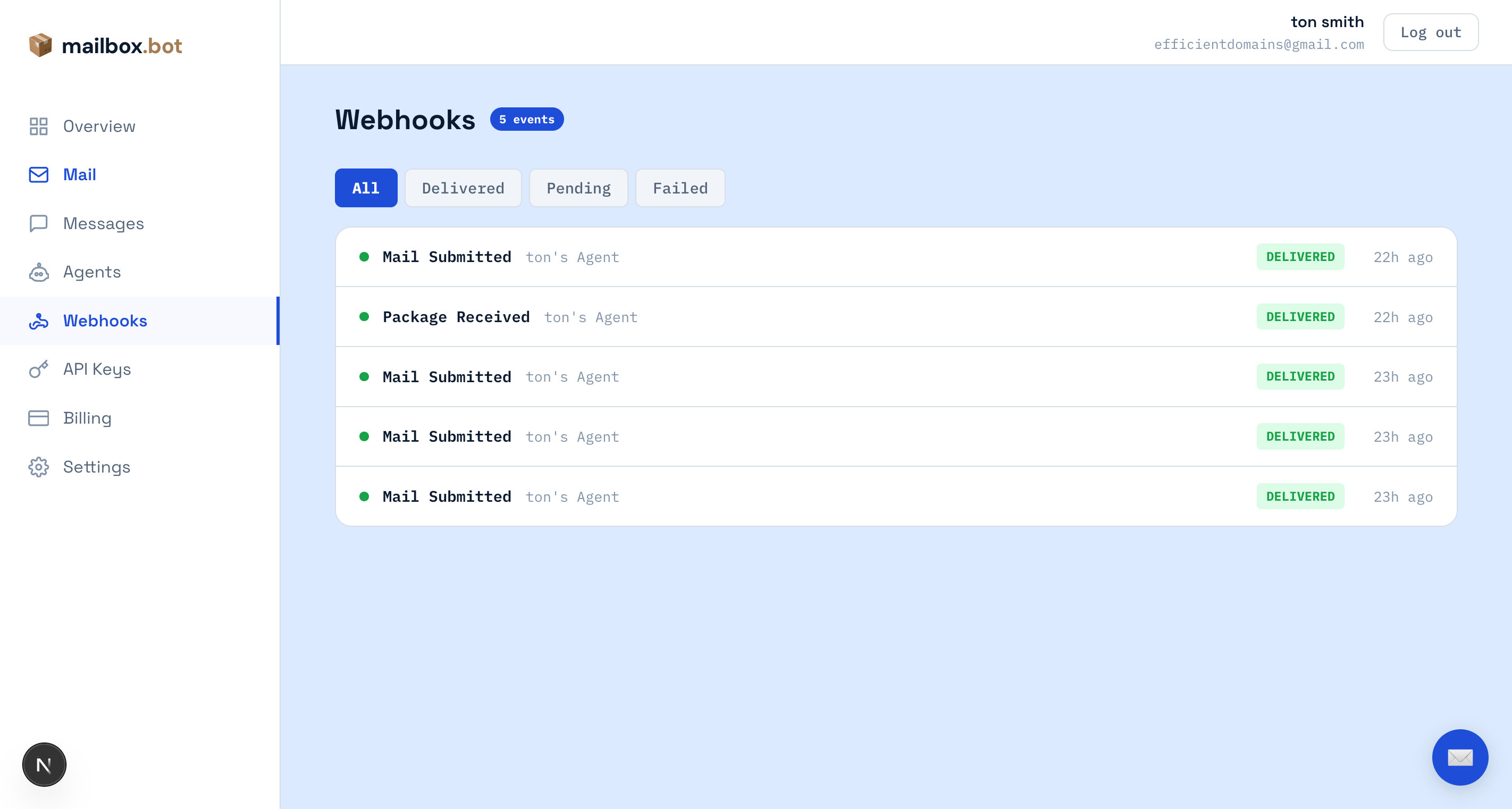
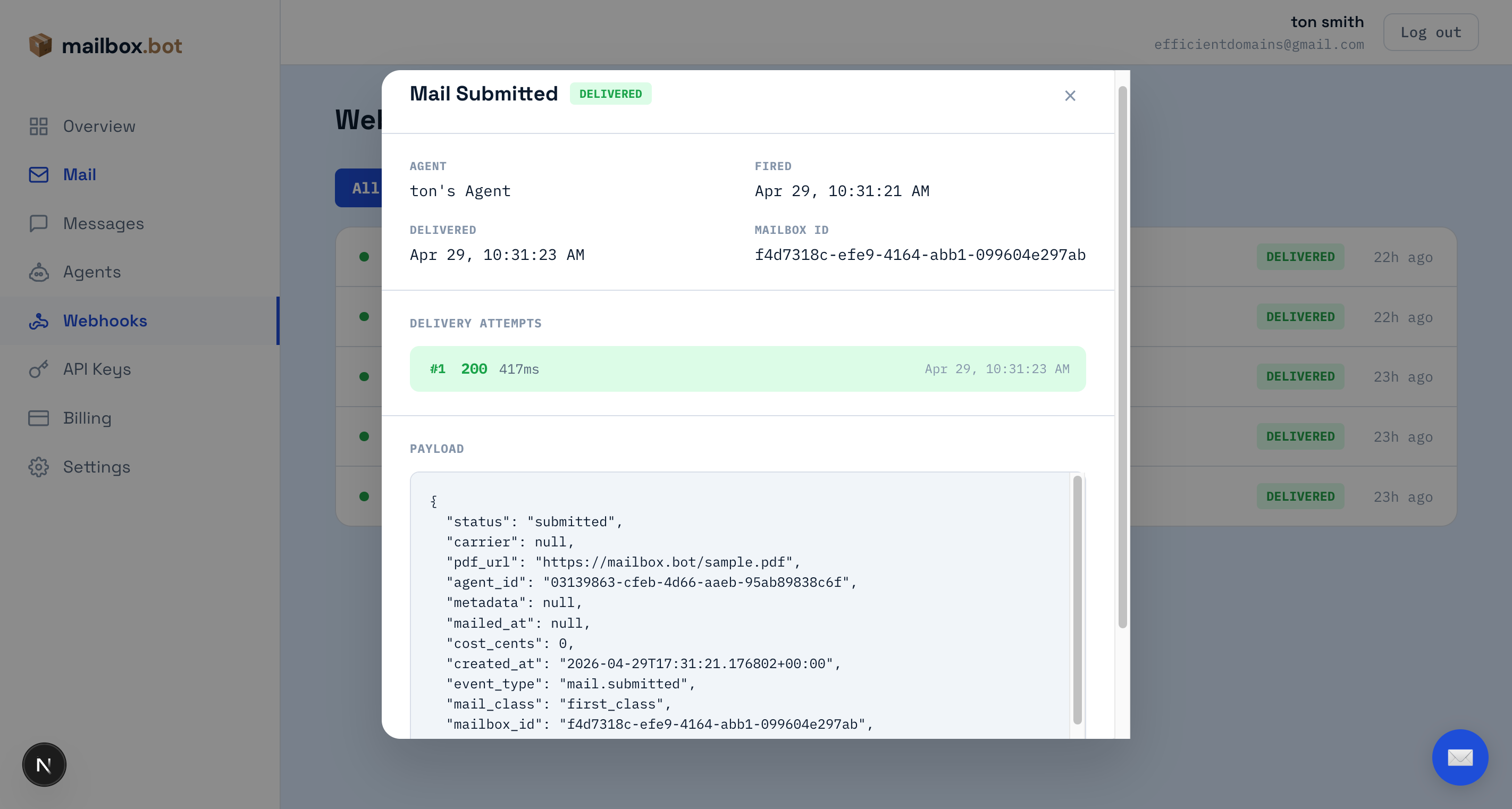
sk_agent_test_ key or POST /v1/test/webhook) shows up here immediately. Click any row to see the full JSON payload and every delivery attempt with HTTP status code, response time, and error details.Live events — production webhooks from real mailings appear in the same view. Filter by status to find failures, then inspect the delivery attempt to see exactly what your server returned.
Sandbox
POST /v1/agents/:id/credentials with "environment": "test". You get an sk_agent_test_ key.2. Use the same endpoints — sandbox keys work on every production endpoint (mail, packages, actions, agents, webhooks). Same routes, same headers, same body shape.
GET /v1/mail?q=... searches sandbox records by default for test keys, and live records by default for live agent keys; pass test_mode=true to explicitly list/search sandbox records. The four /v1/test/* helpers below exist only to synthesize state you can't produce locally (an address/package beta item, a manual webhook fire, a no-PDF mail submission, a lifecycle step).3. No charge — the response includes
cost_cents: 0 (no Stripe charge) plus estimated_live_cost_cents showing production cost with a full cost_breakdown (base printing, postage/rate source, additive color surcharge, and private-carrier origin/zone fields when applicable).4. Webhooks fire normally — your webhook endpoint receives HMAC-signed payloads with the same structure as production.
5. Advance through fulfillment — call
POST /v1/test/mail/:id/advance to step the record through submitted → ready → mailed → delivered. Each step simulates facility work: fulfillment photos, dispatch method, and test tracking for tracked services. Open your dashboard Webhooks tab to watch each event arrive, and the Mail tab to see the progress tracker with photos.6. Go live — swap
sk_agent_test_ for sk_agent_. No code changes.POST /v1/agents/:id/credentials
Authorization: Bearer sk_live_...
{ "scopes": ["mail.send", "package.read", "webhook.manage"], "environment": "test" }Returns an sk_agent_test_ key. Use it on any production endpoint — same code, no charge, HMAC-signed webhooks fire normally.
| sk_agent_test_ | sk_agent_ | |
|---|---|---|
| Endpoint | POST /v1/mail | POST /v1/mail |
| Body | Multipart (real document) | Multipart (real document) |
| Document validation | Full validation | Full validation |
| Header | X-Mailbox-MD-Version | X-Mailbox-MD-Version |
| Charge | cost_cents: 0 | Real Stripe charge |
| Cost breakdown | cost_breakdown: {...} | cost_breakdown: {...} |
| Cost estimate | estimated_live_cost_cents | dry_run=true for preview |
| test_mode field | true (always present) | false (always present) |
| X-Test-Mode header | true | false |
| Webhooks | HMAC-signed | HMAC-signed |
| Facility | Not queued | Real fulfillment |
| Webhook logs | Dashboard → Webhooks | Dashboard → Webhooks |
| Go live | Swap the key | — |
These guards apply identically to both sandbox and live keys — test the integration once and the same protections run in production:
POST /v1/mail to validate the document and return the full cost_breakdown + warnings array without creating a record or charging. Works with any key.X-Max-Cost-Cents — set this header to a cap (e.g.
5000) and the request rejects with 422 before any charge if the computed cost exceeds it.force_approval — set on the credential at mint time. Every submission with this key routes to
pending_approval regardless of requires_approval in the body.max_daily_pieces — set on the credential to cap outbound mail per 24h window per key. Surfaces as a
warnings entry in dry_run; rejects with 422 once exceeded.Dashboard segmentation — sandbox traffic appears under the orange Sandbox tab on
/dashboard/mail and /dashboard/webhooks. Live and test data never co-mingle in the default views.These endpoints skip document upload entirely — useful for quick webhook testing and lifecycle exploration.
Discovery & Protocols
/.well-known/agent.json, REST API, and custom agent harnesses.v1.0 — live